
Finding connection in this digital age can sometimes feel like trying to solve a problem that does not exist.. If you have been scrolling through your feed and wondering how to activate Facebook dating, you are not alone. Unlike other platforms that require a separate download and a brand-new login, this feature lives right inside the app you already use.
In this guide, we’ll walk through exactly how to activate Facebook Dating, troubleshoot the common “where did it go?” disappearing act, and set you up for success without the usual dating app fatigue.
What is Facebook Dating all about?
Let’s talk about what Facebook dating is before we dive into how to activate Facebook dating. Launched as a built-in feature, Facebook Dating is Meta’s answer to the swiping culture. It’s designed to feel more like a community and less like a marketplace. One of the biggest perks? Your dating profile is walled off from your main profile. Your aunt won’t see your dating bio, and your coworkers won’t stumble upon your “looking for someone who loves tacos” pitch unless they are also on the platform (and even then, Facebook tries to keep friends apart).
It uses your existing interests, groups, and events to suggest people who might actually enjoy the same Sunday morning farmers’ market or underground indie concert that you do.
The Pre-Flight Checklist: Are You Eligible?
You can’t just snap your fingers and make it appear. There are a few basic boxes you need to tick before you can learn how to activate Facebook Dating.
Age Requirement: You must be 18 or older. If your Facebook birthday says you’re 17, the feature simply won’t exist for you.
Account Health: Your account needs to be in “good standing.” This means no recent “Facebook jail” stints for community standard violations.
Account Age: New accounts usually have a waiting period. If you created your Facebook profile yesterday, you might need to wait 30 days before the dating doors open.
Geography: While it’s available in over 50 countries (including the US, Canada, and much of Europe), it hasn’t hit every corner of the globe yet.
The App Factor: This is a mobile-only club. You won’t find it on your desktop or laptop browser.
How to Activate Facebook Dating: Step-by-Step Guide
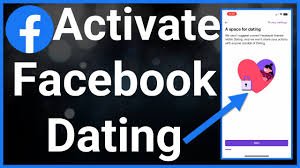
If you are ready to start the Facebook dating journey, Grab your phone and follow these steps to get the ball rolling.
1. Update Your Facebook App
To start: go to the App Store or Google Play Store. If you are using a version of Facebook from 2022, the dating feature might be buggy or missing. Ensure you are using the latest version.
2. Find the Menu
Open your Facebook app and keep an eye out for those three little stacked lines—the “hamburger” menu as some call it. If you’re using an iPhone, you’ll usually spot them tucked away in the bottom right corner, while Android fans will typically find them hanging out at the top right.
3. Locate the Heart Icon
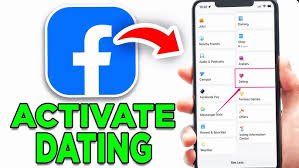
Scroll down through your shortcuts. You’re looking for a purple and pink heart icon labeled “Dating.” If you do not see it immediately, tap “See More” to reveal the hidden options of the app.
4. Tap “Get Started”
Once you tap the Dating icon, you’ll see a welcome screen. This is where the magic starts. Facebook will explain how they protect your privacy (remember: your dating activity doesn’t post to your newsfeed).
5. Build Your Dating Persona
This is the fun part. You’ll choose your gender, whom you’re interested in meeting, and confirm your location. Facebook will suggest a few photos from your main profile, but you can—and should—upload fresh ones that show off your personality.
6. Review and Confirm
After you’ve filled out the basics, you’ll see a summary of your profile. Take a second to make sure your bio sounds like you. Once you hit “Confirm,” you have officially learned how to activate Facebook Dating.
Why Is It Missing? Troubleshooting the Vanishing Act
Sometimes, even if you follow every step on how to activate Facebook Dating, the option remains hidden. Don’t panic; it’s usually a technical hiccup rather than a personal snub from the algorithm.
Location Services: Facebook Dating relies heavily on your GPS. If you’ve disabled location permissions for Facebook in your phone’s settings, the dating feature can’t find people near you and might shut down. Set permissions to “While Using the App.”
The Cache Crutch: If the app is acting sluggish, try clearing your cache (on Android) or offloading the app (on iPhone). This clears out the digital “cobwebs” that might be blocking the dating shortcut.
Force Quit: Sometimes the app just needs a “hard reset.” Close the app completely, swipe it away from your background tasks, and reopen it.
Navigation Bar Settings: If you want the heart icon to stay put at the bottom of your screen, go to Settings & Privacy > Settings > Navigation Bar > Customize the Bar. Look for “Dating” and change it from “Auto” to “Pin.”
Pro-Tips for a Standout Profile
Now that you know how to activate Facebook Dating, let’s make sure people actually want to talk to you.
Skip the Group Photos: Nobody wants to play with your dating profile. Make your first photo a clear, solo shot.
Make use of the “Secret Crush” feature—it is a pretty clever way to test the waters. You can pick up to nine people you are already following on Instagram or friends with on Facebook. The best part? It stays completely under wraps unless they also add you to their list. If they do, it’s an instant match; if not, your secret is perfectly safe with the app.
Integrate Instagram: You can link your Instagram posts to the bottom of your profile. It’s a great way to show that you’re a real human with a real life, without having to write a 500-word essay.
Staying Safe While Swiping
Learning how to activate Facebook Dating is just the beginning; staying safe is the priority. Make use of the built-in “Safety Center” to share your dating plans with friends. Since the app allows you to see mutual friends, use that to your advantage. A quick “Hey, how do you know this person?” to a mutual friend can provide a lot of peace of mind.
Also Read……
- Online Dating Mistakes Americans Still Make
- How to build emotional intimacy
- 10 Signs of a Healthy Relationship
Frequently Asked Questions
No. Facebook specifically hides your dating profile from your current friends. The only exception is the “Secret Crush” feature, but even then, they only find out if they also add you to their list.
Unfortunately, no. To understand how to activate Facebook Dating, you have to use the mobile app on an iOS or Android device.
Yes! Unlike many other apps that has their best features behind “Gold” or “Platinum” subscriptions, Facebook Dating is currently free, including seeing who liked you.
If you need a breather, go to your Dating settings (the gear icon) and look for “Take a Break.” This hides your profile from new people while allowing you to keep talking to your current matches.
Yes, you can use the “Dating Everywhere” feature within the settings. It allows you to add a second location, which is perfect if you’re traveling or planning a move.
How to Activate Facebook Dating: The Final Thoughts
Navigating the world of online romance doesn’t have to be a chore. By knowing how to activate Facebook Dating, you’re opening a door to a platform that prioritizes shared interests and authentic connections over mindless swiping. It’s built into the social fabric you’re already part of, making the transition from “friend of a friend” to “potential match” much smoother.
Take your time with your bio, pick photos that make you feel confident, and remember that the best connections often start with a simple, genuine conversation.